Embedded
The complete font program travels inside the PDF. No machine that opens it needs the font installed.
Safe to send

Loading the PDF Font Embed Checker…
Check whether fonts in your PDF are fully embedded, subsetted, or missing. Find licensing flags, substitution risks, and PDF/A font compliance issues.
Upload a PDF and get a clear, family-by-family embed report: which fonts are fully embedded, subset, or missing — with a print-readiness score and the exact pages each font is used on.
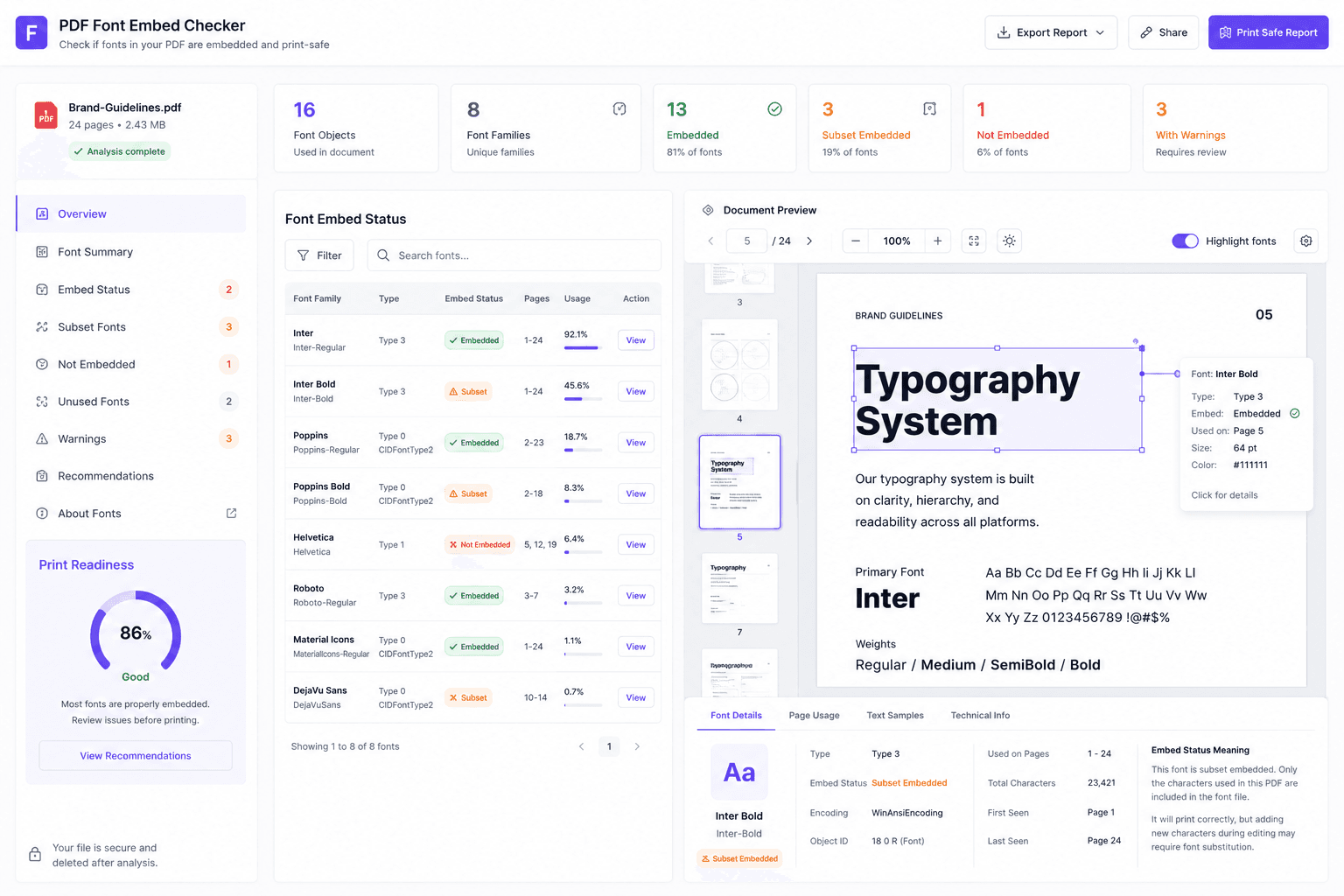
Can this PDF be printed, submitted, archived or shared without the typography breaking? That is the whole job. A font stored inside the file renders the same everywhere; a font merely referenced by name depends on the machine at the other end having it, and when it does not, something else gets substituted and the layout moves.
Short answer for the reaction most people have to their first report: a subset is embedded, and it is fine.
The complete font program travels inside the PDF. No machine that opens it needs the font installed.
Safe to send
Only the glyphs the document used are stored. This is normal, it is why PDFs stay small, and it is still embedded.
Safe to send
The file asks the reading machine for a font it may not have, so the viewer or the RIP substitutes something else.
Fix before sending
The structure did not give enough evidence either way — usually a font stream that could not be read.
Check manually
A subset font stores only the glyphs the document actually used, and is normally named with a six-letter tag before a plus sign — ABCDEE+Arial. It is why a PDF carrying its fonts costs tens of kilobytes rather than megabytes, and both PDF/X and PDF/A accept it. Full embedding is not generally required.Which means a document flagged “Embedded Subset” usually needs nothing done to it at all.Three steps, read-only. No Acrobat licence, no signup, and nothing written back to your file.
The file is read, never modified. Tagged, untagged and scanned PDFs are all accepted.
Every visible font family reports as embedded, subset, not embedded, or could not verify — with the technical font objects behind it kept available.
A print-readiness band with itemised deductions, so every point that was taken off traces back to a named check you can act on.
The readiness score is itemised rather than assigned: every deduction names the check it came from and how many fonts triggered it, so a low score is a to-do list rather than a verdict.
Font embedding is the checkpoint that decides whether a PDF renders predictably somewhere that is not your machine. Six places where that check is enforced.
| Destination | The requirement | Worth knowing |
|---|---|---|
| Commercial print | All fonts embedded; subsets accepted. | One of the most common preflight rejections. A rejection usually costs a day and a re-export you could have done yourself. |
| PDF/X (print exchange) | Every font used must be embedded, in full or as a subset. | Full embedding is not generally required — worth knowing before anyone re-exports a book unnecessarily. |
| PDF/A (archival) | All fonts embedded, and legally embeddable for unrestricted rendering. | An archival file has to be self-contained: in twenty years the fonts it references may exist nowhere. |
| Self-publishing platforms | Embedded fonts required or strongly recommended for interiors and covers. | Files are commonly rejected on this exact point. Treat “not embedded” as a blocker, not a warning. |
| Court e-filing | Several US filing systems explicitly require or recommend embedded fonts. | Requirements are not uniform — check the rule that binds your jurisdiction before the deadline. |
| Theses and repositories | University guidance routinely requires embedding, often alongside PDF/A. | The usual failure is non-English characters, which break first and are noticed last. |
Requirements change and vary by jurisdiction, platform and print vendor. Confirm against the destination’s own current guidelines before a deadline — this report tells you what your file contains, not what a particular organisation will accept today.
A file whose fonts all report as embedded can still show boxes, drop characters or copy out as gibberish. These are different mechanisms, and embedding fixes only the first one.
The subset may not contain the character you need — an accent, a symbol, a non-English letter added after the original export. The font name looks correct and the specific shape is simply absent.
A missing or malformed ToUnicode map produces text that renders perfectly and copies as nonsense. Rendering and extraction are two different mechanisms, and embedding only fixes the first.
When a font uses its own code-to-glyph mapping rather than a standard one, search, copy and accessibility software all read something other than what you see.
Composite fonts used for large character sets and most modern embedding. When their descendant data is invalid the failures are especially confusing, because the page still looks right.
This checker answers the embedding question. When the symptoms point past it — gibberish on copy, boxes in the middle of a word, text that will not extract — the full font checker reports encoding, ToUnicode coverage and glyph data per font object.
Four causes, and the one most people do not expect is a licence rather than a setting.
Font files carry an embedding-permission flag set by the foundry, and some licences prohibit embedding outright. Owning a licence to use a font is not the same as holding the right to embed it — which is why an application can refuse and substitute instead.
Embedding has to be switched on in the export settings, and even then it is unreliable for OpenType/CFF and variable fonts. Turn on “Embed fonts in the file”, re-export, and verify the result rather than trusting the checkbox.
These paths substitute fonts the environment does not have, and they do it silently. Anything bound for print or a formal submission is safer exported from a desktop application with embedding enabled.
Older generators, report engines and HTML-to-PDF converters frequently reference the base fonts rather than embedding anything. The file opens fine on the machine that made it and nowhere else.
Fix it at source wherever you still have the source. Re-exporting with embedding enabled solves every font at once; patching an existing PDF is fiddly and can introduce new encoding problems. Outlining the text is a last resort — it guarantees appearance and destroys searchable, selectable, accessible text.
Ten terms that preflight reports and rejection emails assume you already know.
Always at the same moment: just before the document stops being yours.
Prepress rejects unembedded fonts because output cannot be guaranteed for a typeface the RIP does not have. Checking takes seconds; a rejection costs a day.
Print-on-demand platforms check interiors and covers on exactly this point, and a rejected upload usually arrives after you have already announced a date.
Several court systems require or recommend embedded fonts so that notices and downstream documents generate correctly rather than substituting mid-workflow.
Thesis and repository guidance requires embedding so a document renders the same for every future reader. Non-English characters are what break first.
Stated up front, because finding out afterwards is worse.
There is no embedding step, no PDF/X or PDF/A conversion and no preflight correction. Fix at source or in a tool that has the fonts installed, then re-upload to confirm it worked.
Where the file is ambiguous the report says “could not verify” rather than picking a side, and it reads only the embedding permission the font itself declares — not your licence agreement.
Your PDF is sent over an encrypted connection, inspected without modification, and removed afterwards. Up to 10MB and 100 pages, one document per run; encrypted files must be unlocked first.
Detail in file handling and the privacy policy. Going deeper: encoding and text extraction, the raw font objects, or whether a re-export moved anything.
Upload the file here. Every font family is listed with its embed status — embedded, subset, not embedded, or could not verify — along with the pages it is used on and a print-readiness score. Developers can get the same core answer from the pdffonts command in Poppler.
It means the font is embedded, but only the glyphs your document actually used are stored rather than the complete typeface. It is normal, it is what keeps PDFs small, and it is accepted by PDF/X and PDF/A workflows. A subset is embedded — the panic it causes is almost always misplaced.
The PDF asks the reading machine for a font it may not have, so the viewer or the printer substitutes the closest match it can find. Substitutes rarely share the original character widths, so spacing shifts, lines rewrap and the page you approved is not the page that prints.
Almost always a font that is not embedded. Your machine has the font installed, so the file looks correct to you; another machine does not, so it substitutes. This is the single most common cause of a PDF that changes between the person who made it and the person who opens it.
The file structure did not give enough evidence to say either way — usually a font stream that could not be read. It is reported as its own outcome rather than being rounded down to “not embedded” or up to “embedded”, because guessing in either direction would be misleading.
Yes. PDF/X is built for reliable print exchange, so every font used must travel inside the file. Fonts may be embedded either in full or as subsets — full embedding is not generally required, which is worth knowing before anyone re-exports a document unnecessarily.
Yes. An archival PDF has to be self-contained so it still renders decades from now, when the fonts it references may not exist anywhere. PDF/A also expects the fonts to be legally embeddable for unrestricted rendering, which is a licensing question as much as a technical one.
Frequently, yes — it is one of the most common preflight rejections, because the shop cannot guarantee output for a font it does not have. Check before you send rather than after, since a rejection usually costs a day and a re-export you could have done yourself.
The major print-on-demand platforms require or strongly recommend it for interiors and covers, and files are commonly rejected on this exact point. Confirm every font reports as embedded or subset before uploading, and treat “not embedded” as a blocker rather than a warning.
Many do. Several US court filing systems explicitly require or strongly recommend embedded fonts, and university thesis and repository guidance routinely requires them so documents render consistently for every future reader. Check the specific rule that binds you, since the requirements are not uniform.
Yes, and this is the part most tools skip. Embedding supplies the glyph shapes for rendering, while copying, searching and extraction depend on encoding and Unicode mapping. A file can display perfectly and still copy as gibberish, because those are two different mechanisms.
Usually a missing glyph rather than a missing font. The embedded subset may not contain the character you need — most often an accent, a symbol, or a non-English character that was added after the original export. The font name looks fine; the specific shape is not there.
Because the PDF lacks a dependable map from its internal character codes to Unicode. Custom encodings and a missing or malformed ToUnicode map produce text that renders correctly and extracts as nonsense. Embedding does not fix this — the mapping has to be right too.
A composite font addressed by character IDs rather than single bytes, used for large character sets such as CJK and for most modern embedded fonts. When CID data is missing or invalid the failures are especially confusing, because the file can look correct while extracting and printing badly.
Because font files carry an embedding-permission flag set by the foundry, and some licences forbid it outright. Owning a licence to use a font is not the same as holding the right to embed it, which is why applications sometimes refuse to include one and substitute instead.
Because font embedding has to be turned on in the export settings, and even then it is unreliable for OpenType/CFF and variable fonts. Enable “Embed fonts in the file”, re-export, and then verify the result here rather than assuming it worked.
Those export paths substitute fonts the environment does not have, and they make that decision silently. Anything going to print or to a formal submission is safer exported from a desktop application with embedding enabled, then checked before it leaves your hands.
Only as a last resort, usually when licensing blocks embedding. Outlining guarantees appearance but removes searchable, selectable and accessible text, inflates the file, and makes future edits impossible. Embed where you can and outline only the handful of characters where you cannot.
Re-export whenever you still have the source document. Setting embedding correctly at export takes a moment and fixes every font at once, while patching an existing PDF is fiddly and can introduce new encoding problems. Remediate the PDF only when the source is genuinely gone.
Full embedding can, especially for large character sets. Subsetting is the reason it usually does not — only the glyphs in use are stored, which is why a typical subsetted PDF carries its fonts for a few tens of kilobytes rather than megabytes.
No. It is a read-only checker — your file is inspected and never modified. Fix the embedding where the document was made, or with a preflight tool that has the fonts installed, then re-upload here to confirm it worked.
Only what the font program itself declares about its own embedding permissions. It cannot read your licence agreement or tell you whether a particular commercial use is permitted — for that, check the foundry’s terms.
The PDF is sent over an encrypted connection, inspected read-only, and removed afterwards. It is not stored, shared, indexed or used to train models, and no account is required.
Free, no signup, no watermark. Read-only inspection with a readiness score you can explain to a printer.
Check my PDF fontsAll PDF toolsPDF font checkerPDF object explorerLayout validatorAccessibility checker