1. Build a real document
A sample invoice is rendered by a headless Chromium to PDF — real selectable text, embedded fonts, a ruled table with totals. Not a synthetic file built to be easy to edit.

PDF reference
Every PDF editor claims to preserve your layout. The claim is untestable as stated, which is precisely why everyone makes it. So here is the same claim expressed as a number, along with the method that produced it and the two rendered images you can check it against.
Editing one line of a sample invoice changes 0.02% of the rendered page: 399 pixels out of 2,009,712, confined to a 130 by 13 pixel region. The page dimensions are identical before and after, and every element below the edit — including the entire table — renders pixel-for-pixel unchanged.
The test is deliberately unkind. The edit is made to a line that sits directly above a table — the arrangement that, in a word processor, reflows every element underneath it. If editing were quietly rebuilding the page, the table below would move, and the diff would be smeared down the whole document instead of confined to one line.
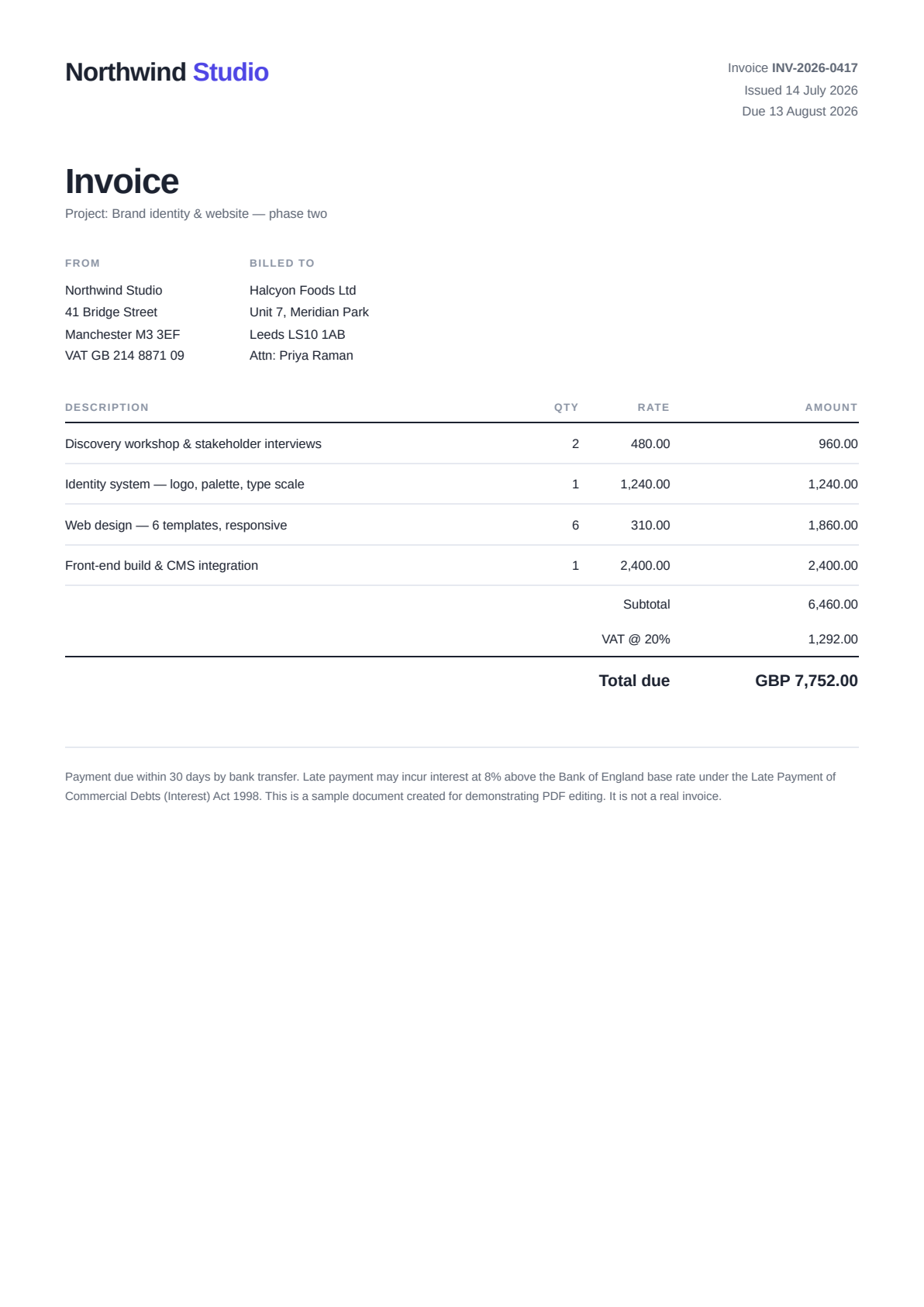
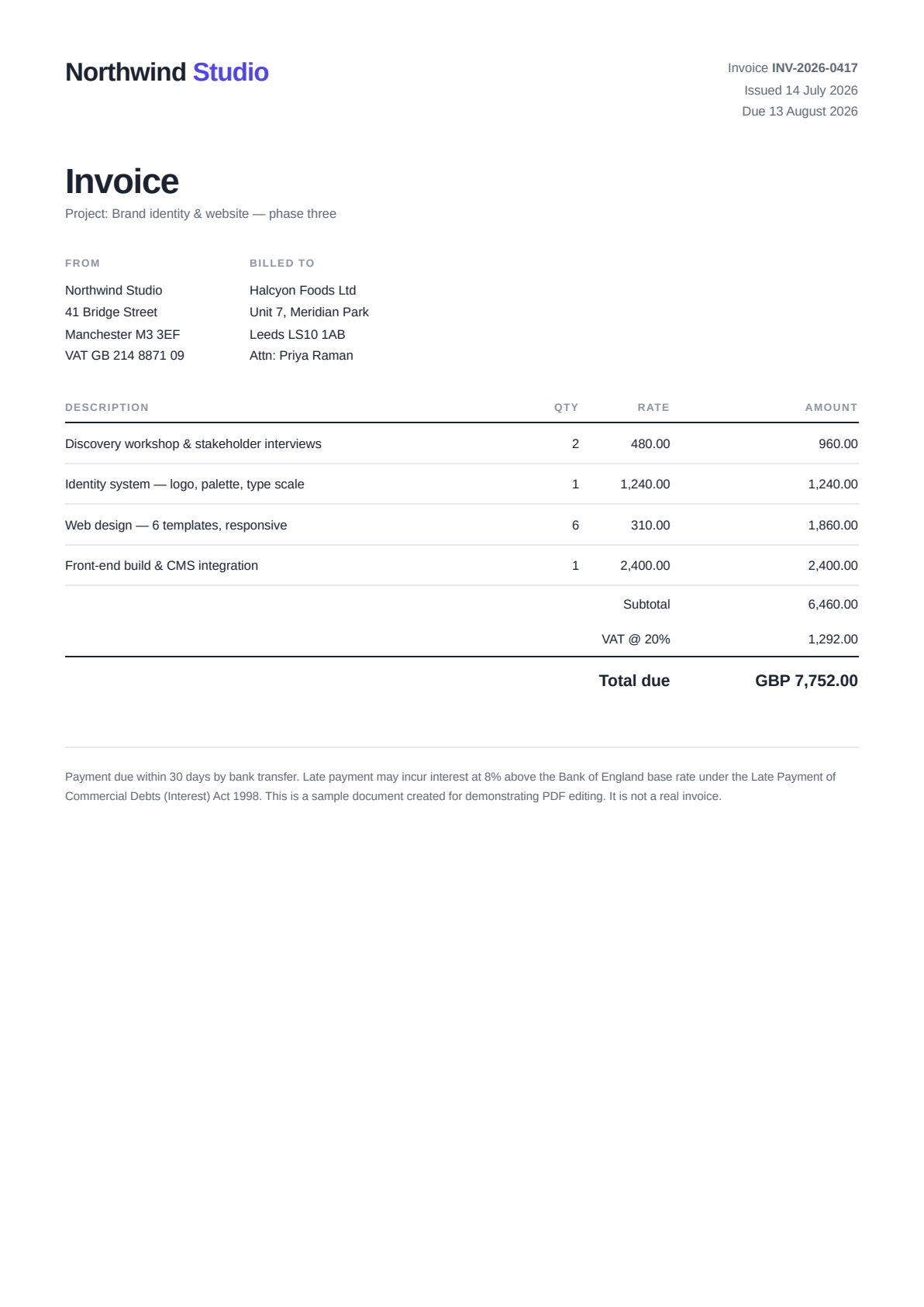
A sample invoice is rendered by a headless Chromium to PDF — real selectable text, embedded fonts, a ruled table with totals. Not a synthetic file built to be easy to edit.
The project line above the table is changed from "phase two" to "phase three" by the same code path the live editor uses. No special benchmark mode, no mock.
Page one of the original and the edited file are rasterised by PDFium at 2× scale, producing two 1192 by 1686 pixel images.
The two renders are subtracted and the bounding box of all non-zero differences is taken. That box is the entire visual footprint of the edit.
If the page dimensions differ, that is layout drift and the run aborts. If the edit does not apply, it aborts. If more than 15% of the page height changed, it aborts and writes nothing.
The before and after images above are committed artefacts of a run that passed all three gates. They can only exist while the claim they illustrate is true.
Both are served from this site: /proof/invoice-before.png and /proof/invoice-after.png. They are the exact outputs of the run described above, not screenshots of it.
Both are 1192 by 1686 pixels. A page whose rendered size changed after an edit has had its geometry rewritten, which is layout drift regardless of what the content looks like.
Any image differencing tool works. The bounding box of the difference is (304, 269) to (434, 282) — a region 130 pixels wide and 13 pixels tall, which is the edited line and nothing else.
399 pixels differ at all, out of 2,009,712 in the page. That is 0.0199%, and every one of them is inside the box above.
Upload your PDF here, change one line, export, then render your original and your export at the same scale and diff them. It is the only PDF editor benchmark that matters, and it takes about five minutes.
Measured on the two committed renders. Every figure below is reproducible from the images on this page.
| Measured | What it establishes | |
|---|---|---|
| Page dimensions | 1192 × 1686 px, before and after | The page geometry was not rewritten |
| Difference bounding box | (304, 269) to (434, 282) | The whole visual change is one line |
| Changed region | 130 × 13 px | No horizontal or vertical spread |
| Vertical band | 13 of 1686 rows (0.77%) | Nothing below the edit moved |
| Pixels changed | 399 of 2,009,712 (0.0199%) | The rest of the page is untouched |
| Table beneath the edit | Pixel-identical | No reflow of dependent content |
| Abort threshold | 15% of page height | The assets cannot exist if drift occurs |
The edit was chosen to sit above a table rather than inside it. Changing a figure inside the table would produce an invoice whose arithmetic no longer adds up — this editor deliberately does not recalculate totals — and a broken invoice is not proof of accuracy.
This measures one edit to one invoice produced by one generator. It demonstrates that in-place editing does not reflow the page; it does not characterise every PDF in the world. Run the same method on your own documents — the method is the transferable part.
A pixel diff proves nothing moved. It does not prove the text is copyable, the fonts are right, or the document is valid. Those need different checks, several of which are free tools on this site.
Replacing a short phrase with a much longer one occupies more of the line by definition. The benchmark tests that the editor does not move things it was not asked to move — not that every possible edit is invisible.
Tables are the most sensitive structure in a PDF and the first thing a reflowing editor destroys. Edit a line directly above one and see what happens underneath.
PDF bytes change for many innocent reasons. Rasterising both files at the same scale and differencing the images measures what a reader actually sees.
If the rendered size changed at all, stop — the page geometry was rewritten and nothing else you measure will mean much.
A tool that draws a white box over old text and new text on top can score perfectly on a pixel diff. Pasting the line elsewhere is what separates a real edit from a convincing overlay.
In this measured test, 0.02% of it: 399 pixels out of 2,009,712, confined to a region 130 pixels wide and 13 pixels tall. The page dimensions were identical before and after, and everything below the edited line — including a full itemised table — rendered pixel-for-pixel unchanged.
A sample invoice is rendered to PDF by a headless browser, giving real selectable text, embedded fonts and a ruled table. One line above the table is edited through the same code path the live editor uses. Both files are then rasterised by PDFium at 2× scale and differenced pixel by pixel. The script aborts and writes nothing if the edit fails, if the page dimensions change, or if more than 15% of the page height differs.
Yes, and that is the point of publishing the images rather than a graph. Both renders are served from this site as PNGs. Difference them in any image tool: the bounding box of the change is (304, 269) to (434, 282), and the pixel count is 399 out of 2,009,712.
Two reasons. Editing a rate inside the table would produce an invoice whose totals no longer add up, because the editor deliberately does not recalculate arithmetic — publishing a broken invoice as proof of accuracy would be self-defeating. And the line above the table is the harder test anyway: in a word processor, changing it reflows everything below.
A difference smeared down the page instead of confined to one band, because content below the edit shifted. Or a change in the rendered page dimensions, which means the page geometry itself was rewritten. Either one aborts the build, which is why the artefacts on this page cannot silently become stale.
No, and this is worth being clear about. An editor that covers old text with a white rectangle and draws new text on top can produce an excellent pixel diff while leaving the original wording in the file. The pixel test measures layout stability; copying the edited line out of the exported PDF is what measures whether the text itself changed.
Take a document with a table. Edit one line above it. Export. Render the original and the export at the same scale and difference them — look for whether the change is confined to the line you touched and whether the page dimensions held. Then select the edited line in the export and paste it somewhere. Those two tests, in that order, tell you almost everything.
A headless Chromium to produce the source invoice, the editor’s own text-edit pipeline for the change, PDFium for rasterising both files at 2× scale, and a standard image-differencing routine for the comparison. Nothing bespoke, so the method transfers to any editor you want to test.
Every one of these opens the same free online PDF editor — each page covers what makes that particular problem hard, and what to do about it.
To edit a PDF without losing formatting, edit the PDF itself instead of converting it to Word and back.
PDF layout survives operations that leave existing objects in place — editing a text run, replacing an image, merging, extracting or deleting pages — and breaks under operations that rebuild the page: converting to another format, rasterising, or re-flowing text.
PDF editors break formatting through five distinct mechanisms: converting the file to another format and back, re-saving the whole document rather than appending a change, re-flowing the edited line from scratch, substituting a font the file does not contain, and rasterising pages into images.
Change the text already in your PDF without converting it to Word.
Free, no signup, no watermark, nothing to install — and no round trip through another file format to get your document back.
Open the PDF editor