Images
Effective resolution measured per image, plus pixel dimensions, bit depth, colour space and the size each one is actually drawn at.

Loading the PDF Quality Checker…
Scan any PDF for print and digital defects — low-resolution images, unembedded fonts, missing BleedBox, RGB colors in print workflows, and transparency.
Upload a PDF and get a quality score with checks across images, fonts, colour, geometry, content, security and accessibility — each finding explained, measured, and highlighted exactly where it occurs.
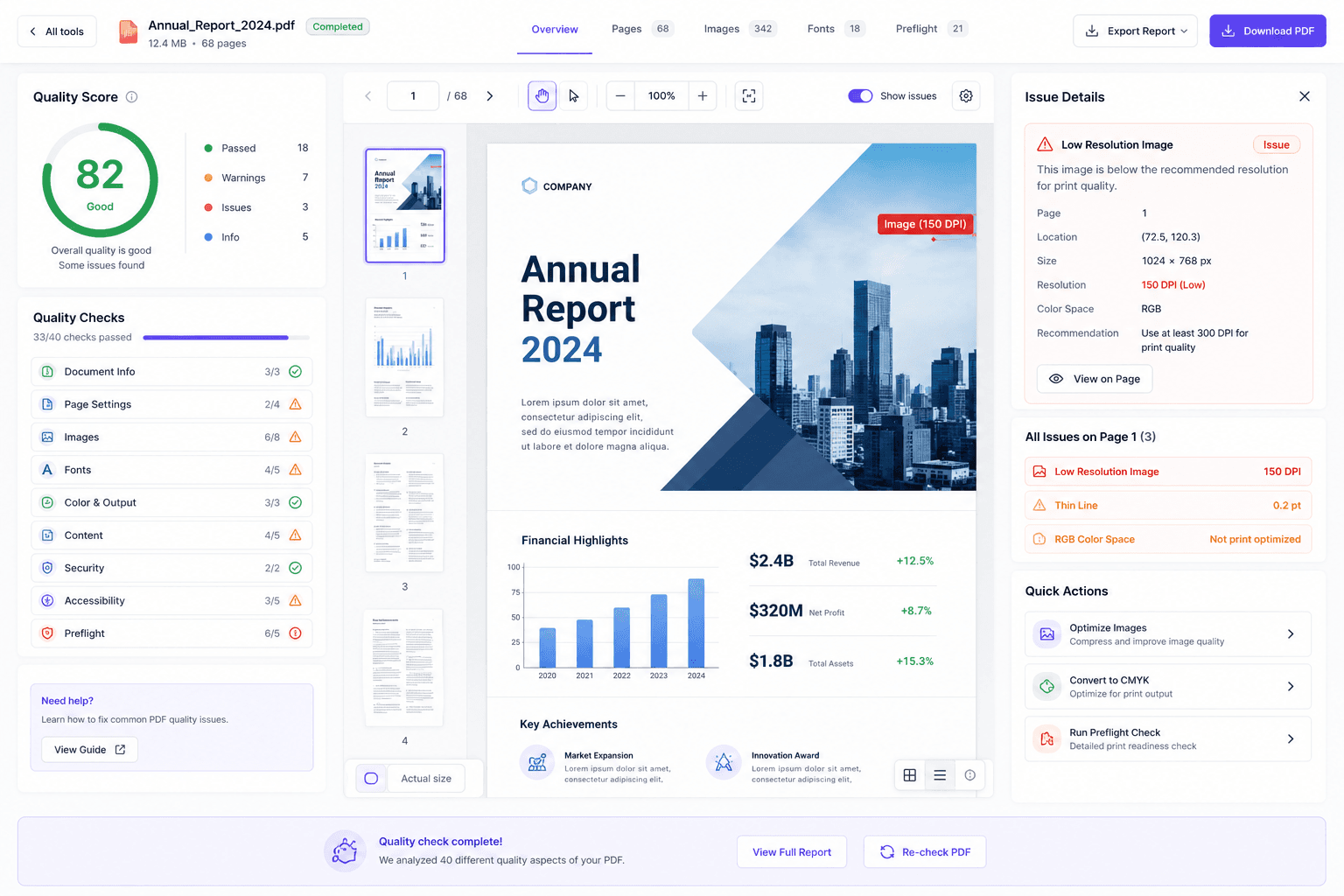
Most PDF problems are invisible until the moment they are expensive — at the press, at the upload, at the filing deadline. This checker measures the things that actually cause rejections and reprints: image resolution at the size it is printed, font embedding, colour space, page geometry, file integrity and security restrictions. Every finding says what it measured, why it matters, and where on the page it is.
Eight categories. Not everything a PDF can get wrong — the things that demonstrably get files rejected, reprinted or sent back.
Effective resolution measured per image, plus pixel dimensions, bit depth, colour space and the size each one is actually drawn at.
Embedding, subsetting and encoding for every font the document uses — the most common single cause of a rejected print job.
RGB and CMYK content identified per object, so a single stray RGB image in a press-bound file is found before the press finds it.
Page sizes, rotation, media and crop boxes, consistency across the document, and the margins a printed page depends on.
Text that is too small to print legibly, blank pages, and pages that carry no extractable text at all.
File integrity, PDF version and the structural problems that make a portal answer “not a well-formed PDF”.
Encryption, permissions and signatures — the restrictions that block assistive technology and get filings refused.
The machine-testable signals: tagging, document language, title, and alt text presence. The judgement calls are flagged, not guessed.
This is the single most useful thing to understand about print quality, and the reason “save it at 300 DPI” is advice that so often fails.
A PDF page is measured in points, not pixels. Only the raster images inside it have a resolution, and the number that matters is the effective DPI: the image’s pixel dimensions divided by the physical size it is actually drawn at. Scale an image up on the page and its effective DPI falls, even though the file on disk never changed.Which is why the same image can be perfectly sharp on one page and unusable on the next.
| The same image, used differently | Pixels | Drawn at | Effective DPI | Verdict |
|---|---|---|---|---|
| Photo placed at full width | 2480 × 1748 | 8.27 in wide | 300 DPI | Print-safe |
| Same photo, half a page | 2480 × 1748 | 4.13 in wide | 600 DPI | More than enough |
| Web logo scaled up | 400 × 120 | 5.00 in wide | 80 DPI | Will print soft |
| Screenshot dropped in | 1920 × 1080 | 7.50 in wide | 256 DPI | Borderline for press |
The checker measures this per image rather than reading a stored value, which is why its number can disagree with what the original file claims. Around 300 DPI at final size is the usual print target, 600 for line art, and rather less for large-format work seen from a distance.
It is good enough for somewhere, or it is not. Six profiles decide which checks apply and how strictly they are applied.
A balanced check for everyday documents, when you just want to know whether anything is obviously wrong before sending it.
For email, web and upload portals. Weighted toward file size, structure and whether the document opens cleanly everywhere.
For an ordinary office printer, where 300 DPI everywhere is overkill but unreadable small text and missing fonts still ruin the output.
For print-shop delivery. The strict one: image resolution, colour space, embedded fonts and page geometry all held to press expectations.
An automated diagnostic across the machine-testable accessibility signals. A starting point for remediation, not a conformance verdict.
For deciding whether a file can be edited without the layout moving — font embedding, text extractability and structural sanity.
A 150 DPI screenshot is fine in an internal report and a blocker in a book interior. A colour space nobody notices on screen decides whether a press job runs. Switching profile re-runs the analysis rather than re-filtering it.
Three steps, read-only throughout. Nothing is written back to your document.
The file is analysed read-only and never modified. Encrypted files need their password removed first.
Choose where the file is going — general, screen and web, office print, professional print, accessibility or editing. The profile decides which checks apply and how strictly.
Every finding carries what was measured, why it matters and what to do about it, and highlights the object that triggered it on the page preview.
The score is itemised, not assigned: every deduction names the check that produced it, its severity, and how many objects triggered it — so a low score reads as a worklist rather than a grade.
Five destinations, and the specific things each one refuses. Most rejections come from this list rather than from anything exotic.
| Destination | What it requires | What the refusal looks like |
|---|---|---|
| Commercial print | Embedded fonts, CMYK, adequate image resolution, bleed where artwork reaches the edge. | Preflight report naming the low-resolution image or the unembedded font. |
| Self-publishing platforms | Embedded fonts, the required PDF/X flavour, CMYK, and image minimums — commonly 300 PPI for images and 600 for line art. | Upload refused, usually citing only the first failure it hit. |
| Court and government portals | A structurally sound file with no encryption and no embedded JavaScript, often text-searchable, under a size cap. | “Document is not a well-formed PDF.” |
| Email and web upload | A file small enough for the limit, which is usually an image-weight problem rather than a page-count one. | Attachment rejected, or an upload that silently fails. |
| Archives (PDF/A) | All fonts embedded and the document self-contained so it renders decades from now. | Validator reports the failing clause and object. |
Requirements change and vary by vendor, platform and jurisdiction — confirm against the destination’s own current guidelines before a deadline. Going deeper on one area? Font embedding, accessibility, or file size.
Six things worth knowing before anyone treats a score as a guarantee — including from us.
A high score means no common blockers were detected for the profile you picked. Presses, portals and platforms each apply their own rules, and some of those are commercial rather than technical.
Tagging, language and alt-text presence are machine-testable. Whether the reading order makes sense and whether a description is meaningful are not — those need a person, every time.
The report flags what commonly breaks PDF/A and PDF/X workflows, which makes it a useful pre-check. Formal conformance should be confirmed with a validator built for certification.
Different tools implement different rules at different strictness. Fewer reported issues does not mean a better document — read the specific rule each tool cites.
An unreadable structure or an encrypted file produces “could not verify” rather than a pass. Untested is not the same as fine, and the report keeps them apart.
Your file is never modified and there is nothing to download. Each finding says what to change and, where one exists, points at the tool for that job.
Stated up front, because finding out afterwards is worse.
Up to 10MB and 100 pages. Your document is analysed and never modified, so there is no output file — the deliverable is the report.
A password-protected PDF cannot be analysed until the encryption is removed, and a partially readable file reports which checks could not run rather than quietly skipping them.
The file is sent over an encrypted connection, analysed, and removed afterwards. It is not stored, shared, indexed or used to train models, and no account is required.
Detail in file handling and the privacy policy. Related checks: fonts in depth, the raw structure, and whether a re-export moved anything.
Almost always a raster image whose effective resolution is too low for the size it is printed at, often because a small web image was scaled up. Upload the file and each image reports its measured effective DPI, so you can see exactly which one is soft rather than guessing.
Because a screen renders at roughly 96 DPI and upscales a low-resolution image smoothly, while a printer asks for far more detail than the image contains. A picture that looks acceptable at 100% on a monitor can be well under the threshold once it hits paper.
Upload it here and pick the profile that matches where the file is going. You get a score with itemised deductions plus checks across images, fonts, colour, page geometry, content, structure, security and accessibility — each finding located on the page it occurs on.
Usually oversized images stored at far higher resolution than they are displayed at, sometimes duplicated resources or unsubsetted fonts. The report shows each image with its pixel dimensions and its rendered size, which is normally enough to identify the culprit immediately.
The most common cause is a font that is not embedded, so the other machine substitutes a different one and the spacing shifts. Colour management and viewer differences account for most of the rest.
A PDF has no single DPI. Only the raster images inside it have a resolution, and what matters is the effective DPI — the image’s pixel dimensions divided by the size it is actually printed at. Around 300 DPI at final size is the usual target for print, with 600 for line art.
Upload the file: every embedded image is listed with its pixel dimensions, its rendered size in inches, and the effective DPI those two produce. That is a measurement rather than a stored value, which is why it can differ from the DPI the original image file claims.
Because effective DPI depends on how large the image is drawn. The same 800-pixel graphic is comfortably sharp in a thumbnail and badly soft across half a page. Resolution is a relationship between pixels and printed size, not a property of the file.
Usually because the graphic is not purely vector — it contains an embedded raster element, such as a placed photo or a rasterised effect. Vector artwork itself has no resolution; the raster inside it does, and that is what gets measured.
Which checks apply and how strictly. A file bound for a print shop is held to bleed, colour space and image resolution that would be irrelevant for an email attachment, and an editing profile cares about things a reader never sees. The same PDF can be fine for one destination and unusable for another.
It means no common blockers were detected for the profile you chose. Every deduction is itemised with the check it came from, its severity and how many times it occurred — so a score is a to-do list, not a verdict, and it is never a guarantee of acceptance.
The check could not be completed — an unreadable structure, content that could not be extracted, or an encrypted file. It is reported as its own outcome rather than being counted as a pass, because recording an untested check as passed is the most misleading thing a checker can do.
Yes, wherever the finding has a location. Selecting a check highlights the exact object that triggered it on the document preview — which is usually faster than reading a description and hunting for the image or text it refers to.
Run it against the professional print profile and read the blocking findings first: non-embedded fonts, low effective DPI, RGB content in a CMYK job, and missing bleed cause most rejections. Passing those does not guarantee acceptance, but failing any of them almost guarantees a rejection.
The recurring causes are fonts that are not embedded, RGB content where CMYK is required, images below the resolution minimum, and files that are not in the required PDF/X flavour. Check all four before re-uploading, since platforms usually report only the first failure they hit.
Bleed is artwork extended past the trim line — commonly 0.125 inches or 3 mm — so that when the guillotine cuts slightly off, no white edge appears. You need it whenever colour or imagery is meant to reach the edge of the finished page, and not otherwise.
The file has a structural problem — a damaged cross-reference table, a truncated save or a corrupt page — or it contains something the portal forbids, such as encryption or embedded JavaScript. Court and government filing systems reject on all of those.
RGB is how screens make colour and CMYK is how presses make it, and CMYK covers a smaller range. A vivid RGB image prints duller, and print workflows that require CMYK will reject a file containing RGB content — sometimes over a single image nobody remembered adding.
No, and no automated tool can. It runs the machine-testable checks and flags what fails, but reading order, alt-text quality and whether colour is the only cue all need a person. The dedicated accessibility checker explains that split in detail.
No. The report flags the issues that commonly break those workflows, which is a useful pre-check, but formal conformance is a certification question and should be confirmed with a validator built for it before anything is submitted as compliant.
Because they implement different rule sets at different strictness and make different judgement calls about ambiguity. A tool reporting fewer issues is not necessarily looking at a better document. Read the specific rule each one cites rather than trusting the totals.
No. It is read-only: your file is never modified and there is nothing to download. Each finding explains what to change and, where one exists, points at the tool that does that job. Fix at source where you still have the source, then re-check.
The PDF is sent over an encrypted connection, analysed read-only, and removed afterwards. It is not stored, shared, indexed or used to train models, and no account is required.
Free, no signup, no watermark. Read-only analysis with every finding measured, explained and located.
Check my PDFAll PDF toolsFont embed checkerAccessibility checkerLayout validatorCompress PDF