Remove Watermark from PDF Online Free: Step-by-Step Guide
Remove unwanted text, image, and stamp watermarks from your PDF online for free. Learn how object-level vector detection works with zero registration required.

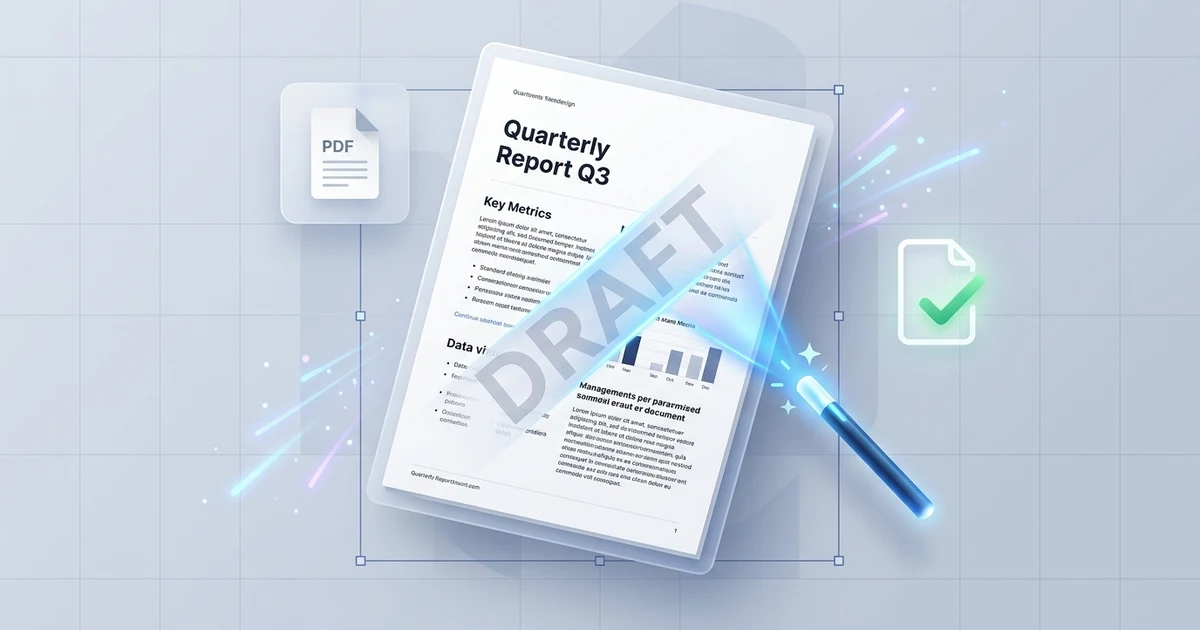
You open a PDF contract, architectural schematic, academic paper, or presentation draft only to find an oversized "DRAFT," "CONFIDENTIAL," or obsolete company logo stamped diagonally across every page. In many cases, the watermark covers vital tables, obscures legal clauses, or makes the document unsuitable for submission.
When you attempt to delete the mark using standard desktop viewers or basic online tools, you quickly run into frustrating roadblocks. Adobe Acrobat Pro's "Remove Watermark" command frequently does nothing because it only recognizes watermarks generated by Acrobat itself. Meanwhile, cheap web converters either paste an ugly white rectangle over your text, blur your typography through lossy compression, or hold your document hostage behind an aggressive paywall or mandatory sign-up form.
Watermarks are stored in several distinct ways inside the PDF specification (ISO 32000-1). Removing them cleanly without damaging the underlying layout requires identifying whether the mark is an independent vector object, an optional content layer, an annotation stamp, or a burned-in raster pixel.
The Quick Answer:
Yes, you can remove watermarks from a PDF online for free without installing software or registering an account.
Open the Online PDF Watermark Remover, upload your document, and let the analyzer inspect your file. The tool scans every page for repeated vector text, image overlays, annotation stamps, and layer groups (/OCG). Review the detected marks, check the boxes for the items you want to delete, and click remove. Your clean, original PDF is generated instantly without watermarks, registration prompts, or quality loss.
⚡ Remove Watermarks from Your PDF in Seconds
Clean up your document without damaging fonts, layout, or image clarity:
👉 Open Online PDF Watermark Remover (Free & No Sign-Up) →
Object-Level Detection · Vector Text & Image Removal · No Account Required · 100% Free
Why Most PDF Watermark Removers Fail: The Technical Reality
To understand why generic tools either fail completely or ruin document quality, it helps to look inside the internal object structure of a Portable Document Format file.
Under the ISO 32000-1 standard, a PDF is not a flat canvas like a JPEG, nor is it a fluid word-processing flow like a Microsoft Word .docx file. A PDF is an object-oriented database composed of content streams, dictionaries, graphics states, and resource catalogs.
How Primitive "Whiteout" Converters Work (Destructive):
[Original Page: Text + Diagonal Watermark]
          ▼ (Overlay Opaque Shape or Re-encode Image)
[Opaque White Box Placed Over Watermark] ➔ Destroys Underlying Text & Lines
          ▼ (Flatten Page to Bitmap JPEG)
[Degraded 150 DPI Pixelated Document] ➔ Blurry Text, Huge File Size

How True Object-Level Removal Works (Surgical Vector Extraction):
[PDF Object Catalog]
  ├── Page Content Stream (/Contents) ──> Operates text (Tj / TJ) & paths
  ├── XObject Resource (/XObject)     ──> Repeated Logo Image / Stamp
  └── Optional Content Group (/OCG)   ──> Independent Watermark Layer
          ▼ (Inspect & Isolate Target Object IDs)
[Purge Watermark Dictionary References & Stream Drawing Operators]
          ▼ (Direct Vector Serialization)
[Pristine Document] ➔ Original Text Intact, Vectors Untouched, 100% Crisp
When an application places a watermark on a PDF, it generally utilizes one of four methods:
1. Optional Content Groups (OCG Layers)
Modern layout tools and enterprise document software often place watermarks inside an Optional Content Group (OCG). These are genuine PDF layers resolved by the PDF reader at render time. Because the watermark lives in an isolated layer dictionary, removing it is completely lossless: purging the layer leaves 100% of the underlying text, vectors, and imagery untouched.
2. Repeated Image Overlays (/XObject)
Corporate watermarks, copyright logos, and security seals are frequently embedded as external form or image objects (/Do operators referencing an /XObject sub-dictionary). These objects repeat across pages at identical coordinate offsets. A dedicated object parser identifies the repeated hash of the watermark image and removes every instance from the page resources without re-compressing the rest of the document.
3. Annotation Stamps (/Annots)
Stamps such as "APPROVED," "REVISED," or "CONFIDENTIAL" are often stored as annotation objects (/Subtype /Stamp) in the page's /Annots array rather than within the core page content stream. Standard text editors cannot highlight them because they do not exist in the text layer. An object-level removal tool inspects the annotation tree and deletes the stamp object directly.
4. Content Stream Vector Text (Tj and TJ Operators)
When watermarks are generated by print drivers or basic export engines, they are written as raw text drawing commands directly into the /Contents stream—often set with low opacity (/ca or /CA graphics state parameters) and rotated via coordinate transformation matrices (cm operator). Standard viewer buttons like Acrobat's "Remove Watermark" ignore these because they lack Acrobat-specific metadata tags. They must be parsed, matched, and stripped out of the content stream directly.
5. Flattened Scans and Raster Bitmaps (The Non-Removable Exception)
If a PDF was generated by a physical scanner or flattened into a single image before distribution, there are no independent text or vector objects inside the file. The watermark pixels and the letter pixels share the exact same bitmap grid. In such cases, no tool can "remove" the watermark without using lossy AI inpainting that alters the underlying text. An honest tool detects flattened pages immediately and alerts you up front rather than delivering corrupted output.
How to Remove a Watermark from a PDF Online for Free
Follow this step-by-step tutorial to detect and purge unwanted watermarks using our dedicated online tool:
Step 1: Open the Online Watermark Remover
Navigate directly to the Online PDF Watermark Remover. You do not need to enter an email address, sign up for a trial, or install browser extensions.
Step 2: Upload Your Watermarked PDF
Drag and drop your document into the secure upload area. The server-side inspection engine immediately analyzes the document's structure, scanning every page's content streams, resource dictionaries, annotations, and layer catalogs.
Step 3: Review Detected Watermark Candidates
Unlike blind converters that alter files without showing you what they are touching, our tool generates an itemized report of every detected mark:
- Object Type: Identifies whether the mark is an image overlay, vector text, an OCG layer, or an annotation stamp.
- Page Coverage: Shows whether the mark appears on all pages, a specific page range, or isolated sheets.
- Confidence Rating: Displays detection signals so you can see why the object was classified as a watermark.
Step 4: Confirm Removal and Download
Check the boxes next to the watermark objects you wish to eliminate. Click Remove Watermark. The engine strips the selected object dictionaries and exports a clean PDF. Click Download to save your pristine file.
(Need to make further textual corrections or update dates after removing the watermark? Use our full-featured Online PDF Editor to edit vector text in the same font).
Comparison: Online PDF Edits vs. Common Watermark Removal Tools
| Feature | Online PDF Edits Watermark Remover | Adobe Acrobat Pro | Aspose PDF Online | iLovePDF / Smallpdf |
|---|---|---|---|---|
| Cost | 100% Free | $239.88 / year | Limited free tasks | $48–$84 / year (Paywalled) |
| Sign-Up Required? | ❌ No account or email | Mandatory Adobe ID | Account required for batches | Mandatory registration |
| Object-Level Detection | ✅ Vectors, Images, Stamps, Layers | ⚠️ Only Acrobat-added marks | ⚠️ Basic text replacement | ❌ General editor / Whiteout |
Layer (/OCG) Removal | ✅ Clean extraction | ✅ Supported | ⚠️ Partial | ❌ Flattens layers |
| Preserves Original Quality | ✅ 100% Lossless vector output | ✅ Lossless | ⚠️ Inconsistent formatting | ⚠️ Often recompresses pages |
| Scanned / Flattened Warning | ✅ Honest up-front detection | ❌ Fails silently | ❌ Fails silently | ❌ Distorts document |
| Batch Page Processing | ✅ All pages or custom ranges | ✅ Supported | ⚠️ Slow execution | ⚠️ Paywalled feature |
(Looking to convert clean PDF documents to editable plain text formats? Check out our guide on using the PDF to Markdown Converter).
Ethical and Legal Boundaries of Watermark Removal
Before removing a watermark, it is important to understand when document modification is legally and professionally appropriate:
-
Legitimate Use Cases:
- Internal Drafts: Removing expired "DRAFT" or "INTERNAL REVIEW ONLY" stamps from internal company documents before final distribution.
- Brand Refreshes: Deleting obsolete logos or previous agency branding from company templates and presentation decks you own.
- Software Trial Marks: Cleaning evaluation stamps from technical documentation or schematics generated by software your organization has since licensed.
- Correcting Accidental Stamps: Removing an erroneous "VOID" or "CONFIDENTIAL" watermark placed on a public announcement or regulatory filing.
-
Prohibited Use Cases:
- Never remove watermarks from copyrighted stock photography, proprietary blueprints, academic papers, or commercial digital products you do not have permission to alter.
- In the United States, removing or altering Digital Millennium Copyright Act (DMCA) Copyright Management Information (CMI) under 17 U.S.C. § 1202 carries strict statutory liability. Only modify documents you own or are legally authorized to edit.
Frequently Asked Questions
Is there a way to remove watermark from PDF?
Yes. Upload your document to the Online PDF Watermark Remover. The engine parses the document's internal resource trees, isolates independent watermark objects (such as repeated background images, vector text streams, annotation stamps, or OCG layers), and purges them cleanly without altering surrounding text or images.
How to remove watermark from PDF free?
Drag your file into the Online PDF Watermark Remover. The tool scans all pages, highlights the detected watermark objects, and allows you to remove them with a single click at zero cost. There are no page limitations, payment gates, or forced subscriptions.
How to remove watermark from PDF document for free?
Open the Online PDF Watermark Remover, upload your PDF document, select the identified watermark objects from the candidate list, and click remove. The engine deletes the object dictionaries from the content stream and delivers a clean file immediately.
What is the process for removing watermark from PDF online free?
The process involves three steps: first, upload your file to the Online PDF Watermark Remover; second, review the detected candidate objects (text, image, stamp, or layer) on the inspection screen; third, click Remove and download your sanitized PDF. No local software installation or user login is required.
How do I remove watermark on PDF file?
To remove a watermark on a PDF file, open the Online PDF Watermark Remover and upload your document. If the mark is an annotation stamp or vector layer, the tool unlinks the object from the page catalog. If the mark is repeated page text, the content stream parser deletes the specific text display operators without disturbing the body copy.
How can I remove watermark from PDF file?
You can remove watermarks from any standard PDF file using the Online PDF Watermark Remover. Navigate to the page, select your document, confirm the detected watermark type, and click download. For individual unwanted sentences or isolated paragraphs on a single page, you can also use the Online PDF Editor to select and delete text elements directly.
How do I remove watermark online and free using Aspose PDF?
Aspose provides an online demo and cloud API for watermark processing, but users frequently report slow processing times, strict file size limits, or complex interfaces. The Online PDF Watermark Remover provides a streamlined, instant in-browser inspection workflow that requires no coding, no registration, and handles large documents smoothly.
How to remove unwanted object from PDF online free?
Launch the Online PDF Watermark Remover for repeated backgrounds, stamps, or logos. For isolated graphical elements, obsolete signatures, or unwanted paragraphs on specific pages, open the Online PDF Editor, click directly on the unwanted object, and press delete to eliminate it cleanly.
How to watermark a PDF for free?
Open the Online PDF Editor, upload your document, select the Text or Image tool, and position your watermark diagonally or in the header/footer with customized opacity and rotation. Once positioned, export the document to embed the watermark into the file structure.
How to remove watermark for free?
Visit the Online PDF Watermark Remover from any modern web browser on Mac, Windows, iOS, or Android. Drag your file into the tool, verify the detected watermark candidate, and export the cleaned file. The entire service is 100% free with no trial periods or watermarks added to your download.
Can AI remove watermarks from PDF files?
No, AI is rarely the correct tool for true digital PDF watermarks. While generative AI inpainting tools can reconstruct missing pixels in flattened photos or scanned images, they alter and degrade surrounding text. For digital vector PDFs, algorithmic object extraction is far superior because it physically deletes the watermark vector object from the document's resource catalog, leaving the original text 100% sharp and unchanged.
How do I remove a watermark from a PDF using I Love PDF?
Open iLovePDF's edit tool, select the watermark element, and press delete. However, many users discover that iLovePDF cannot remove watermarks embedded as background content streams or optional layers—it primarily manages editable text overlays or applies cosmetic cover-ups. For deep object-level extraction of repeated backgrounds and stamps, use the dedicated Online PDF Watermark Remover.
Why does Adobe Acrobat's Remove Watermark button fail to delete my watermark?
Acrobat's built-in "Remove Watermark" command only recognizes watermarks that were created and tagged by Adobe Acrobat itself. If the watermark was inserted by Microsoft Word, Google Docs, an architectural CAD exporter, or a virtual PDF printer, Acrobat treats it as standard page artwork and ignores the command. Dedicated object-level tools detect and delete these marks regardless of which software created them.
Why is there a white box left behind after removing a watermark?
A white box appears when a tool uses cosmetic "whiteout" instead of true object deletion. Rudimentary converters draw an opaque white polygon over the watermark, which permanently covers any text or grid lines underneath. True object removal purges the watermark's drawing operator from the content stream, leaving the underlying canvas completely unblemished.
Can you remove watermarks from scanned PDFs without quality loss?
No. In scanned PDFs, the document consists of a single rasterized image per page where letters and watermark pixels are merged. Removing a watermark from a scanned page requires graphic erasing or inpainting, which inevitably damages the texture and line quality underneath. When a document is scanned, our tool alerts you immediately so you can seek the original digital source file.
Will removing a watermark invalidate a digital signature?
Yes. In the PDF specification, a cryptographic digital signature creates a mathematical hash over the entire document byte sequence. Any subsequent change—including deleting a watermark or modifying a layer—breaks the hash and marks the signature as invalid or modified. Always remove unwanted watermarks before applying final cryptographic signatures.