Best PDF Redaction Tools in 2026: Compared and Tested
Not every redaction tool actually deletes the text — some just draw a black box over it. Here's how to tell the difference and which tools get it right.

Choosing the wrong PDF redaction tool has cost lawyers their bar licences, exposed patient records, and blown confidential negotiations. The NSA published a guidance memo on this exact problem in 2008 — and people are still getting it wrong in 2026. The risk is simple: many tools that claim to "redact" content just paint a black rectangle on top. The underlying text stays in the file, readable by anyone who copies and pastes or inspects the PDF source. This post compares the five most widely used redaction tools, explains what separates true redaction from cosmetic redaction, and tells you which to use depending on your compliance requirements.
True Redaction vs Cosmetic Redaction: The Distinction That Matters
This is the most important concept in the entire post, so it leads.
Cosmetic redaction overlays a black shape — a rectangle, filled annotation, or opaque image — on top of the text or image you want to hide. The PDF viewer shows a black bar, so the content appears hidden. But the original text is still present in the file's content stream. Open the PDF in a text editor, use Ctrl+A and copy, or run it through a PDF parsing library, and the "redacted" content comes right out. This is how the infamous 2005 SCO Group filing leak happened, and how a UK government Iraq dossier leaked in 2003.
True redaction removes the content from the PDF entirely — the text is deleted from the content stream, the glyph data is gone, and the space is replaced with a permanent black rectangle baked into the page. There is no underlying data to recover because it no longer exists in the file.
A quick test: after redacting, select all text on the page and paste it into a text editor. If you can still read the "redacted" content, your tool failed.
The consequences of getting this wrong are not theoretical. GDPR violations can reach €20 million or 4% of annual global turnover. HIPAA penalties start at $100 per violation and scale to $1.9 million per violation category per year. In legal proceedings, improperly redacted documents have resulted in mistrials and sanctions.
Comparison: Top PDF Redaction Tools in 2026
| Tool | True Redaction | Batch Redact | Pattern Match | Price |
|---|---|---|---|---|
| Adobe Acrobat Pro | Yes | Yes | Yes (SSN, phone, email) | $19.99/mo |
| Nitro PDF Pro | Yes | Yes | Limited | $179/yr |
| OnlinePDFEdits | Yes | No | No | Free |
| Foxit PDF Editor | Yes | Yes | Yes | $14.99/mo |
| PDFEscape | No (cosmetic) | No | No | Free / $2.99/mo |
A few notes on this table. PDFEscape's free tier applies a filled rectangle annotation, not true redaction — do not use it for any compliance-sensitive document. Adobe and Foxit both perform genuine content-stream removal and support pattern matching, which matters when you need to strip SSNs or email addresses across a 200-page document. OnlinePDFEdits performs true redaction on individual selections with a 0.5 coverage threshold for detection, making it the most accessible free option that actually works correctly. Nitro's pattern matching is limited compared to Adobe and Foxit, which is worth knowing if batch processing is your primary use case.
OnlinePDFEdits Redaction: How It Works
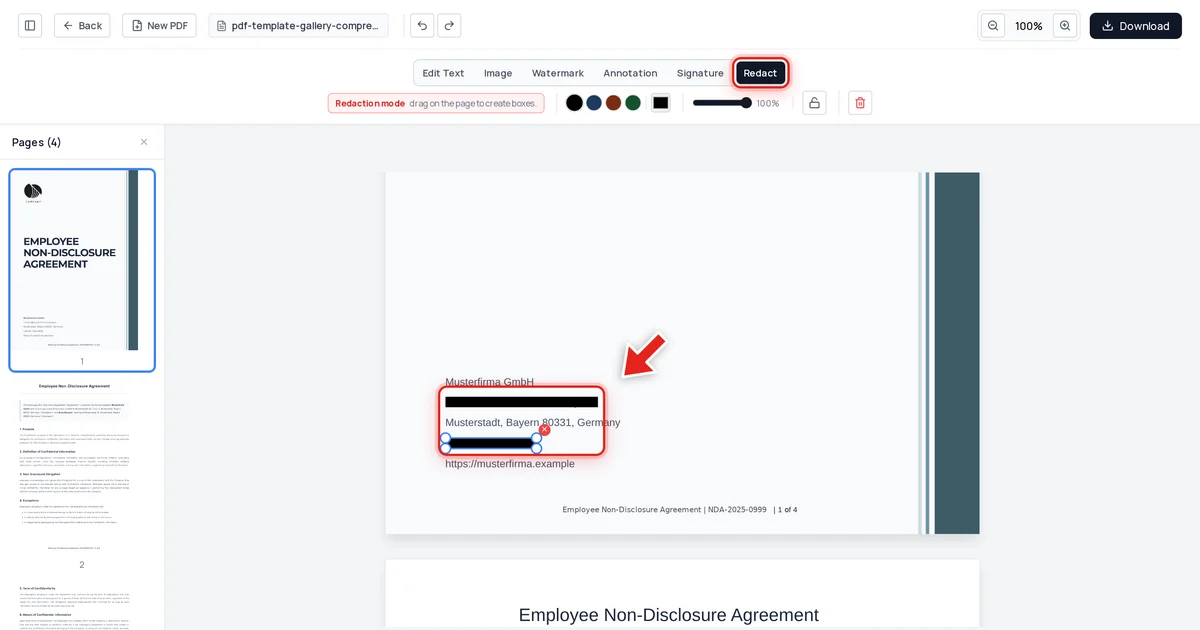
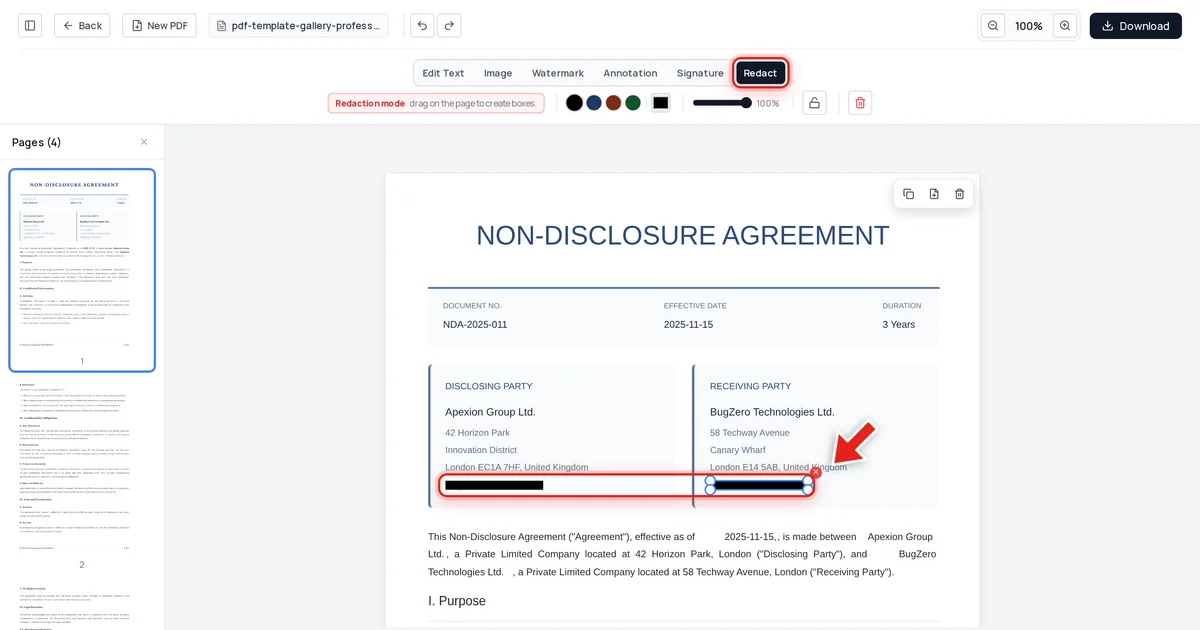
The free online PDF editor at OnlinePDFEdits implements true redaction: when you mark a region for redaction, the tool removes the underlying text from the PDF content stream rather than overlaying a shape. The redacted area is replaced with a permanent black rectangle baked into the exported file.
The tool uses a 0.5 coverage threshold for detection — if a redaction block covers more than 50% of a text element's area, that element is treated as redacted and stripped from the content. This prevents edge cases where partially overlapping selections leave fragments of sensitive text in the output.
There have been user reports of redaction blacking out wrong areas. This typically happens for one of two reasons. First, coordinates in PDFs use a bottom-left origin, while screen coordinates use a top-left origin — some tools with coordinate-system bugs apply the redaction rectangle to the wrong vertical position on the page, especially on non-standard page sizes. Second, scanned PDFs that haven't been OCR-processed contain no text in the content stream at all, so any "redaction" of a scanned page is inherently cosmetic unless the tool rasterises and redraws the page. If you're redacting a scanned document, verify by zooming in on the exported file and checking whether the black bar aligns with the intended content.
OnlinePDFEdits works without a subscription for individual redactions, which makes it a strong choice for one-off compliance tasks — redacting a single contract, removing a patient name from a referral letter, or stripping a bank account number from a statement before sharing.
Pattern-Based Redaction: When You Need It
Pattern-based redaction automates the process of finding and removing specific categories of information across an entire document. Instead of manually marking each instance, you define a pattern — a Social Security Number format, email address structure, or phone number regex — and the tool scans every page and applies redaction to every match.
This matters at scale. A 300-page deposition transcript might contain hundreds of SSN references. A medical records batch exported for litigation discovery could have patient names appearing thousands of times. Manual redaction of those documents is both slow and error-prone — a single missed instance creates the same liability as redacting nothing at all.
Adobe Acrobat Pro's pattern library covers the most common compliance categories out of the box: SSNs, credit card numbers, phone numbers, email addresses, dates of birth, and custom regex patterns. Foxit PDF Editor offers a similar feature set at a lower price point. If you're processing documents regularly for HIPAA compliance or e-discovery, either of those tools is the right choice. For occasional use on individual documents, OnlinePDFEdits' manual selection is sufficient and free.
One practical tip: always run pattern redaction on a copy of the original document first and verify the output before destroying the original. Pattern matching is not perfect — it can catch false positives (a reference number that resembles an SSN) or miss context-dependent information (a name used as a header that doesn't match any pattern).
Metadata Redaction: The Hidden Problem
Visible text is only part of what needs to go. PDFs routinely contain metadata that survives standard redaction — and that metadata can be just as sensitive as the content itself.
Author and creation information. The document's author field often contains the full name or username of whoever created or last edited it. For legal documents, this can reveal which firm or attorney drafted a document that was supposed to be produced without identifying information.
Comments and annotations. Review comments, tracked changes, and sticky notes remain in the file unless explicitly removed. A redlined draft shared during negotiations can expose internal deliberations even if the visible text is clean.
Embedded attachments. PDFs can carry other files as attachments — spreadsheets, images, Word documents — that never appear in the visible page view but are accessible to anyone with the right reader.
Version history. Some PDF creation tools embed incremental update streams that allow previous versions of content to be reconstructed.
To address metadata, use your tool's "sanitise document" or "remove hidden information" function in addition to content redaction. Adobe Acrobat Pro and Foxit both expose this as a separate step. If you need to lock down a PDF further after redaction, password-protecting the file adds a layer of access control that prevents casual inspection of the output.
Compliance Requirements: GDPR, HIPAA, and Legal Proceedings
Compliance requirements shape which redaction approach you need.
GDPR (EU/UK) treats any information that could identify a living person as personal data — names, addresses, IP addresses, identification numbers, biometric data. If you're sharing a document that contains personal data about EU residents, redaction of that data before sharing is one way to comply. The regulation doesn't mandate a specific tool, but it does require that removal be effective — cosmetic redaction does not meet the standard.
HIPAA (US healthcare) requires protection of 18 categories of protected health information (PHI), including names, geographic subdivisions smaller than a state, dates (except year), phone numbers, email addresses, SSNs, medical record numbers, and biometric identifiers. De-identification under HIPAA's Safe Harbor method requires removing all 18 identifiers. Expert determination requires a qualified statistician to certify that re-identification risk is very small. In either case, cosmetic redaction fails the standard.
Legal proceedings and e-discovery in US federal courts are governed by FRCP rules. Courts have imposed sanctions for producing improperly redacted documents. The standard is that the redacted information must be genuinely inaccessible — not merely hidden from casual view.
For any of these contexts, test your redacted output: copy all text from the exported PDF and verify the sensitive content is absent. If you're regularly handling HIPAA-covered records or discovery documents, encrypting the PDF after redaction limits who can open the file in the first place.
If you're also managing document sets — splitting redacted sections out as separate deliverables or merging multiple redacted files into a single production set — tools like merge PDF, extract pages, and delete PDF pages handle that without requiring a full Acrobat subscription.
For more on keeping PDFs secure beyond redaction, see our post on browser PDF viewer issues — some viewer configurations can expose content you'd expect to stay private.
FAQ
Is free PDF redaction safe for HIPAA-covered documents?
It depends entirely on whether the tool performs true redaction (removes content from the PDF stream) or cosmetic redaction (overlays a shape). Free tools that perform true redaction — including OnlinePDFEdits — are technically capable of producing HIPAA-compliant output. What matters is the method, not the price. Always verify by copying text from the exported file to confirm the sensitive content is gone before distributing the document.
How do I know if my redaction actually worked?
Open the exported PDF, press Ctrl+A to select all text, and paste into a plain text editor. If the text you intended to redact appears in the paste, the redaction was cosmetic and failed. You can also open the PDF in a PDF inspection tool or run it through a parser. True redaction means the content simply isn't there — not that it's hidden.
Can I redact a scanned PDF?
Scanned PDFs are images of pages, not text — there's no content stream to remove. Any black box placed on a scanned PDF is inherently cosmetic because there was no text underneath. To truly redact a scanned document, the tool must rasterise the page and redraw it with the sensitive area physically painted over, then re-export the rasterised image as a PDF. This destroys the scan quality slightly but removes the content permanently. Check that your tool explicitly supports scanned PDF redaction before processing sensitive scanned files.
What's the difference between redaction and encryption?
Redaction removes specific content permanently from the document — the information is gone. Encryption protects the entire document with a password — the information is still there but inaccessible without the key. You can encrypt a PDF as an additional access control layer on top of redaction, but encryption alone does not redact: if someone obtains the password, they can read everything, including content you intended to hide.