PDF Text Editor Online Free Same Font: Edit PDF Text
Discover how to use a PDF text editor online free to edit text while keeping the same font, size, and layout without watermarks or software installation.
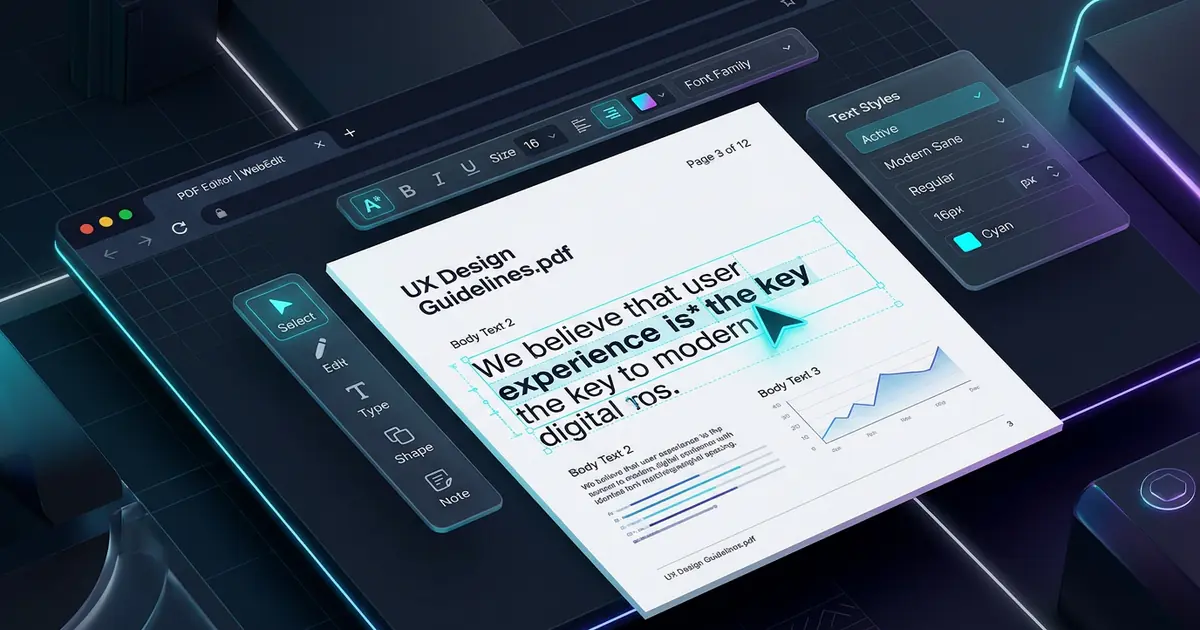
Can you edit existing text in a PDF online for free while keeping the exact same font? Yes. For digital text-layer PDF documents, you can edit existing text directly in your browser while preserving the original font family, weight, size, color, and character kerning using OnlinePDFEdits. Unlike traditional utilities that force a lossy Microsoft Word conversion, paste an opaque whiteout box over your document, or impose a monthly paywall, direct inline PDF editing modifies the underlying ISO 32000 PDF content streams and font dictionaries—delivering clean, publication-ready documents with zero watermarks and zero registration.
                    ┌────────────────────────────────────────────────────────┐
                    │ How Traditional Tools vs OnlinePDFEdits Handle Fonts   │
                    └───────────────────────────┬────────────────────────────┘
                                                │
         ┌──────────────────────────────────────┴──────────────────────────────────────┐
         ▼                                                                             ▼
┌──────────────────────────────────────────────┐              ┌──────────────────────────────────────────────┐
│ Legacy & Basic Approaches                    │              │ OnlinePDFEdits (True Inline Text Engine)     │
├──────────────────────────────────────────────┤              ├──────────────────────────────────────────────┤
│ • Whiteout tools (TechRex): pastes white box │              │ • Parses /Font & /FontDescriptor dictionaries│
│ • Desktop apps (PDFgear): 500MB download     │              │ • Replaces characters in native text streams │
│ • Converter tools: breaks tables & fonts     │              │ • Recalculates horizontal line coordinates   │
│ • Freemium tools (Sejda): 3-task limits      │              │ • Metric fallback for missing subset glyphs  │
│ • Enterprise suites (Adobe): $19.99/mo gate  │              │ • 100% Free, zero-install, no account needed │
└──────────────────────────────────────────────┘              └──────────────────────────────────────────────┘
The Core Problem: Why Most Free PDF Editors Fail to Keep the Same Font
When you attempt to correct a misspelled name on a contract, update an expiration date on an invoice, or revise a bullet point in a resume, most search results for a free PDF editor fail you in one of four ways:
- The "Whiteout & Overlay" Trick: Basic web viewers and utilities like PDFescape or TechRex (
pdffreeeditor.com) do not actually edit existing text. Instead, they draw an opaque white rectangle over the original text and position a generic system font (usually standard Arial, Helvetica, or Times New Roman) on top. The result is immediately noticeable: mismatched letter spacing, misaligned baselines, and a visible rectangular patch that looks unprofessional. - The "Desktop Download Footprint": Software like PDFgear offers native text editing, but it requires downloading and installing a 300MB to 500MB desktop application package on your computer or mobile device. For users on locked-down office computers, Chromebooks, or those who simply need a 30-second fix, a heavy native installation is an unnecessary barrier.
- The "Convert to Word" Trap: Many cloud converters attempt to convert your PDF into a Microsoft Word
.docxfile. While Word allows unrestricted typing, compiling the document back to PDF frequently breaks vector tables, shifts tab stops, corrupts columns, and substitutes proprietary corporate typefaces with default system fonts. - The Subscription Paywall: Commercial suites like Adobe Acrobat Pro gate direct inline text editing behind a paid subscription ($19.99/month on an annual commitment, or $29.99/month on flexible billing), locking simple document edits behind an expensive paywall.
To understand how modern browser editors solve this without converting or whiteout tricks, we must examine how PDF typography is compiled under the international ISO 32000 specification.
The Technical Reality: PDF Typography, Content Streams & Embedded Subsets
A PDF file is fundamentally different from a word processor document. It is a compiled vector page description format governed by ISO 32000-1 and ISO 32000-2 standards (maintained by the PDF Association).
When software compiles a document into a PDF, it does not store fluid paragraphs. Instead, it serializes static graphics and text state instructions inside PDF content streams using specialized operators:
BTandET: Begin Text and End Text object delimiters.Tf: Sets the active font resource and point size.Tm/Td: Sets the text matrix coordinates and line position.Tj/TJ: Shows individual strings or arrays of glyphs with relative kerning offsets.
Example Native PDF Content Stream:
BT
  /F1 12 Tf
  1 0 0 1 72 712 Tm
  (The agreement expires on December 31, 2024.) Tj
ET
Why Embedded Font Subsets Require Intelligent Fallback Handling
To minimize file size, PDF creators (such as Microsoft Word, Adobe InDesign, macOS Quartz, and LaTeX) do not embed entire font libraries. Instead, they embed font subsets—storing only the specific character glyphs that appear in that document, tagged with an arbitrary six-letter prefix (for example, ABCDEF+Calibri or XYZ123+Aptos).
When you edit an existing PDF:
- Characters Present in the Subset: If you replace characters with letters or numbers already compiled into that font subset (e.g., changing
"December 31, 2024"to"December 31, 2025"when the digit5was used elsewhere in the document), OnlinePDFEdits parses the parent/Fontdictionary's/Widthsarray and/ToUnicodeCMap, retrieving the native vector glyph outlines directly from the embedded/FontFilestream. The new text is a 100% identical match. - Characters Omitted from the Subset: If you type a character, foreign accent, or symbol that never existed in the original document, the embedded font subset does not possess a vector glyph outline for that character.
Under ISO 32000 (Clause 9.8), while the /FontDescriptor dictionary defines global typographic metrics (/CapHeight, /Ascent, /Descent, and /StemV), individual glyph advance widths reside in the parent /Font dictionary's /Widths array (or /W and /DW for composite CIDFonts). Rather than failing or reverting to a jarring unscaled system font, OnlinePDFEdits solves missing subset glyphs by reading these exact parent width tables and dynamically applying a metric-compatible font fallback matching the exact font classification:
- Sans-Serif Originals: Fallback to metric-aligned modern sans (Roboto, Open Sans, Liberation Sans).
- Serif Originals: Fallback to metric-aligned serif typefaces (Liberation Serif, Tinos).
- Monospaced Originals: Fallback to metric-aligned fixed-width typefaces (Liberation Mono, Courier Prime).
This architectural precision prevents horizontal text drift, ensures uniform baseline alignment, and keeps your revisions visually seamless.
Comparison: OnlinePDFEdits vs. Other Online PDF Editors
Here is an objective comparison of how OnlinePDFEdits compares to both low-authority web utilities and industry-standard commercial tools:
| Feature / Capability | OnlinePDFEdits | EasyPDF (easypdf.fr) | TechRex (pdffreeeditor.com) | Sejda PDF | Adobe Acrobat (Free / Pro) |
|---|---|---|---|---|---|
| True Inline Text Editing | Yes (Direct click-to-edit) | Partial (AI font guess) | No (Whiteout overlay) | Yes (Direct inline) | Paid Pro only ($19.99/mo) |
| Font Preservation Engine | Embedded subset + metric fallback | Approximate matching | No (Generic system font) | Native text parsing | Full font engine (Paid) |
| Free Usage Limits | 100% Free (Unlimited) | Free tier | Free with ads | 3 tasks / hour limit | 7-day trial, then locked |
| Watermark Added | None (100% Clean) | None | None | None | None (Editing locked in Free) |
| Installation Required | Zero (In-browser WebAssembly) | In-browser | In-browser | In-browser | In-browser / Desktop app |
| Processing Architecture | Client-side sandbox | Remote cloud upload | Remote cloud upload | Remote cloud upload | Cloud / Local sync |
| Full PDF Suite Available | Compress, Merge, Tools | Minimal | Basic | Full suite | Enterprise suite |
Step-by-Step Guide: How to Edit PDF Text Online Free While Keeping the Same Font
Modifying existing text with precise font matching takes less than 30 seconds. Follow these steps:
Step 1: Open the Online PDF Editor
Navigate to the OnlinePDFEdits Text Editor. You do not need to register an account, enter a credit card, or provide an email address.
Step 2: Upload or Drop Your PDF File
Drag and drop your PDF into the editor canvas or click "Select PDF file". Your file is loaded instantly into your browser's local memory.
Step 3: Click Directly on Any Existing Text
Hover your cursor over the word, sentence, date, or number you need to revise. The editor identifies the bounding box of the active text element. Click inside the line to activate the inline editing cursor.
Step 4: Type Your Modifications
Type your corrections directly. The engine automatically handles low-level text state properties:
- Matching Typeface Family: Reuses the embedded font subset or selects a metric-compatible serif/sans fallback.
- Identical Size & Weight: Matches point size, bolding ratios, and italic angles.
- Matching Fill Color: Inherits the active RGB, CMYK, or grayscale non-stroking color operators directly from the content stream.
- Character Spacing & Horizontal Alignment: Recalculates horizontal text matrices (
Tm) and character advance widths so updated phrases flow naturally with surrounding words on the line.
Original text:    "The tenant agrees to pay a monthly rent of $1,200 starting on June 1."
Click & replace:                                              $1,450             July
Updated result:   "The tenant agrees to pay a monthly rent of $1,450 starting on July 1."
(Surrounding text shifts smoothly; matching font weight, baseline, and color)
Step 5: Save & Download Your Document
Click the "Apply Changes" button to commit your edits into the PDF object stream, then click "Download PDF" to save your updated file. Your document exports immediately with crisp, vector-sharp typography ready for printing, emailing, or archiving. If your document is large, you can also run it through our free compress PDF tool before sharing.
Security, Privacy & File Integrity: Why Local Browser Processing Matters
When editing financial contracts, tax forms, employment records, or identity documents, security and data privacy are paramount.
               ┌────────────────────────────────────────────────────────┐
               │         Client-Side vs Remote Cloud Processing         │
               └───────────────────────────┬────────────────────────────┘
                                           │
         ┌─────────────────────────────────┴─────────────────────────────────┐
         ▼                                                                   ▼
┌─────────────────────────────────┐                         ┌─────────────────────────────────┐
│ Remote Cloud Upload Editors     │                         │ OnlinePDFEdits (Client-Side)    │
├─────────────────────────────────┤                         ├─────────────────────────────────┤
│ • File uploaded to third-party  │                         │ • WebAssembly sandbox in browser│
│ • Stored on remote cloud servers│                         │ • File never leaves your device │
│ • Potential data breach exposure│                         │ • Zero server upload or storage │
│ • Cross-border regulatory risks │                         │ • Complies with GDPR Article 5  │
└─────────────────────────────────┘                         └─────────────────────────────────┘
1. Zero Server Upload & Data Minimization
Many online utilities upload your confidential documents to third-party cloud servers where they may persist indefinitely. Under the data minimization principles established in Article 5(1)(c) of the General Data Protection Regulation (GDPR) and commercial security guidance published by the Federal Trade Commission Business Center, storing customer documents without explicit necessity creates unnecessary legal and identity theft exposure.
OnlinePDFEdits operates directly inside your web browser using compiled WebAssembly (Wasm). Your document vectors are parsed and edited entirely within your local device memory, adhering to the sandboxing security model defined by the W3C WebAssembly Security Specification.
2. Clean Attachment Syntax & Email Gateway Delivery
Poorly engineered PDF editors often generate corrupted cross-reference (xref) tables or malformed object streams during file export. When you email these documents, corporate security filters (such as Microsoft Exchange or Google Workspace) may quarantine the message as suspicious. Adhering to sender hygiene guidelines outlined in the Google Email Sender Guidelines and Microsoft Defender Anti-Spam Guidance ensures that your exported PDFs maintain clean file headers (%PDF-1.7), valid indirect object structures, and zero corrupted streams.
[!WARNING] Important Note on Cryptographically Signed PDFs (PAdES / PKCS#7):
Under ISO 32000-1/2 (Clause 12.8), a cryptographic digital signature computes a cryptographic hash over the exact byte range (/ByteRange) of the signed document revision. Modifying the underlying page content streams or font dictionaries inherently alters these bytes and will invalidate any pre-existing cryptographic digital signature. If you are revising an already-signed agreement, update the text first and then re-apply your digital signature using an authorized signing service.
Troubleshooting Common PDF Font Editing Challenges
While OnlinePDFEdits handles standard digital PDFs seamlessly, certain documents present structural edge cases:
1. What If the PDF Text Is Scanned (A Raster Image)?
If clicking on the text does not bring up an editable cursor, the document is a scanned image (photograph of paper) rather than a digital vector PDF. A standard PDF editor cannot directly change letters baked into a bitmap image. To edit text on a scanned document, it must first be processed with Optical Character Recognition (OCR) to reconstruct character glyphs and background layers.
2. What If the Document Has Owner Password Restrictions?
Certain banking statements and legal templates include permissions flags (the /P bitmask in the /Encrypt dictionary) that restrict content editing. If your file is locked against modifications, you must first remove the owner permission restrictions before updating text.
3. What If Newly Typed Characters Look Slightly Different?
If you add characters that were never included in the original document's embedded font subset, the editor will automatically apply a metric-compatible fallback font matching the original typeface's serif, sans-serif, or monospaced classification. To achieve a perfectly uniform appearance across long paragraphs, you can select the entire text block and set it to a widely available universal typeface (such as Arial, Inter, or Times New Roman).
Frequently Asked Questions (AEO & Direct Answers)
Can I edit text in a PDF online for free without losing the original font?
Direct Answer: Yes, for all digital text-layer PDFs when typing characters present in the embedded font subset. Click on the existing text using OnlinePDFEdits. The engine automatically inherits the embedded font dictionary, point size, and color. If you introduce characters missing from the original subset, the editor seamlessly applies a metric-compatible fallback font matching the original serif or sans-serif style.
Does this free PDF text editor leave a watermark on my document?
Direct Answer: No. OnlinePDFEdits exports 100% clean, professional documents with zero promotional watermarks, zero company logos, and no forced branding.
Why do some PDF editors change the font to Times New Roman or Arial when I edit?
Direct Answer: Because they use whiteout overlay boxes instead of true content stream editing. Basic editors cannot decode embedded PDF font dictionaries or parse character advance widths, forcing them to paste white rectangles over original text and type with generic system typefaces.
Is it safe to edit confidential contracts and bank statements in a browser?
Direct Answer: Yes, because processing occurs client-side in your local browser. OnlinePDFEdits uses WebAssembly to execute all document modifications directly on your device. Your file is never uploaded to remote servers or stored in third-party databases, eliminating cloud data breach risks.
Can I edit PDF text on Mac, Windows, iPhone, and Android?
Direct Answer: Yes. OnlinePDFEdits runs natively inside any modern web browser (Chrome, Safari, Edge, Firefox) across desktop and mobile devices without requiring software downloads or browser extensions.
Ready to Edit Your PDF with the Matching Font?
Say goodbye to clumsy Word conversions, ugly whiteout patches, and expensive subscription paywalls. Correct typos, update dates, and edit existing PDF text in seconds while keeping your document's original styling intact:
👉 Launch the Free Online PDF Text Editor Now
Need additional document tools? Explore our free PDF Compressor, PDF Merger, or discover why professionals trust our platform as the leading Smallpdf alternative.