How to Change Date on PDF Document Online Free
Easily change dates on any PDF document online for free. Update printed page text with matching fonts and modify PDF metadata timestamps without Adobe Acrobat.
To change a date on a PDF document online for free, open your document in OnlinePDFEdits, select the text tool, click directly on the existing date to edit the numbers in-place, and download your updated PDF. This replaces the vector text stream while keeping the original embedded font, exact coordinates, and formatting intact—without requiring Adobe Acrobat or converting your document to Word.
                  ┌─────────────────────────────────────────────────────────┐
                  │      Changing a Date on a PDF: The Two Layers           │
                  └────────────────────────────┬────────────────────────────┘
                                               │
               ┌───────────────────────────────┴───────────────────────────────┐
               ▼                                                               ▼
┌─────────────────────────────────────────────┐ ┌─────────────────────────────────────────────┐
│ 1. Visible Document Text (Page Content)     │ │ 2. Internal Metadata (ISO 32000 Info Dict)  │
├─────────────────────────────────────────────┤ ├─────────────────────────────────────────────┤
│ • Printed date on invoices, resumes, forms  │ │ • Technical `/CreationDate` & `/ModDate`    │
│ • Rendered as vector glyphs (`Tj` operator) │ │ • Stored as `D:YYYYMMDDHHmmSS` string       │
│ • Edited via direct in-place vector editor  │ │ • Inspected via PDF Object Explorer         │
│ • Requires matching font metrics & kerning  │ │ • Verified by compliance & portal systems   │
└─────────────────────────────────────────────┘ └─────────────────────────────────────────────┘
The Two Types of Dates on a PDF Document
When people need to modify a date on a PDF file, they usually mean one of two things:
- The visible text date on the page: The printed date appearing on an invoice header, employment contract, rent agreement, or bank receipt. Changing this requires modifying the underlying content stream instructions without shifting surrounding text.
- The hidden document metadata date: The technical creation timestamp (
/CreationDate) and last-modified timestamp (/ModDate) embedded inside the PDF file dictionary. Automated submission portals, legal discovery pipelines, and compliance verification tools inspect this metadata to determine when the document was originally generated.
Most generic PDF tools only address one half of the problem or force you into destructive compromises. Below is how to handle both layers cleanly, accurately, and for free.
Method 1: Changing the Visible Date on the PDF Page
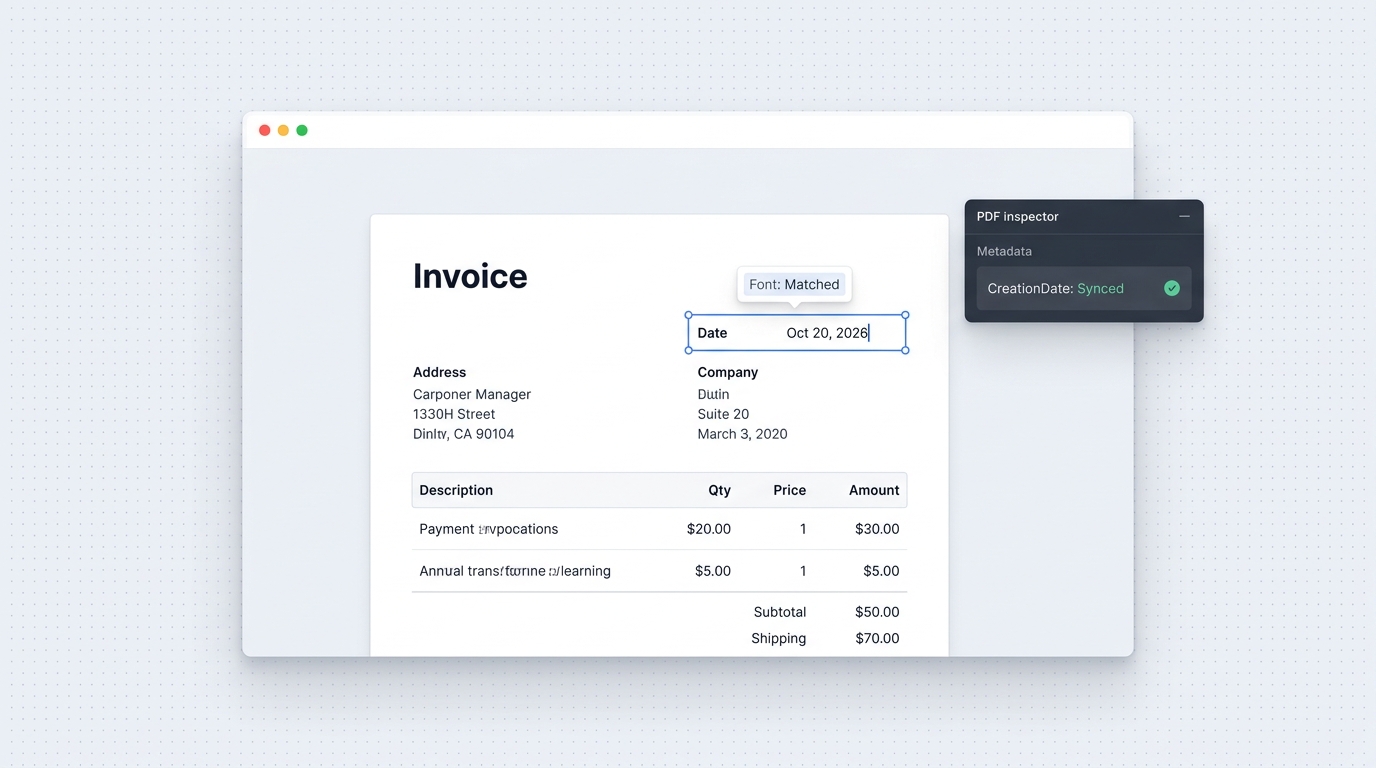
If you need to change a date that appears visually on the page (for example, updating October 12, 2024 to October 20, 2026), do not use an opaque white box or an image editor like Photoshop. Those methods introduce visible blur and misaligned fonts.
Step-by-Step Guide to In-Place Date Editing:
- Upload your PDF: Navigate to the Online PDF Editor in any web browser. Drag and drop your file into the editor.
- Select the Date Text: Click on the date you wish to update. The editor detects the text element and its bounding box directly within the page stream.
- Type the New Date: Backspace the old digits and type the new date. The editor automatically samples the surrounding font family, weight, and point size to match the original typography.
- Download the Clean PDF: Click Save & Download. The updated document maintains vector crispness at any zoom level with zero watermarks.
Why You Should Never Use Photoshop to Change a Document Date
A common mistake is rasterizing a PDF in Adobe Photoshop to erase the old date and type new text. While Photoshop is a capable graphics editor, opening a vector PDF in Photoshop causes severe document damage:
- Rasterization at Low DPI: Photoshop flattens vector fonts into raster pixels. Even at 300 DPI, zooming into the document reveals fuzzy pixel artifacts around the new date compared to the crisp mathematical vectors of the rest of the page.
- Massive File Bloat: A 150 KB vector contract often balloons to 15 MB or larger after being saved from Photoshop.
- Immediate Forgery Triggers: Automated compliance tools and PDF readers can immediately detect when a document's vector text stream has been converted into a raster bitmap image.
Using a native vector editor like Edit PDF Text modifies the PDF's text drawing operators (Tj and TJ) directly, preserving true scalable vectors.
Method 2: Modifying Hidden PDF Creation and Modification Metadata
Every standard PDF compliant with ISO 32000-1 includes an internal /Info dictionary containing technical metadata timestamps:
<<
  /Title (Service Agreement)
  /Author (Accounting Dept)
  /CreationDate (D:20241012143000Z)
  /ModDate (D:20261020091500Z)
  /Producer (OnlinePDFEdits Engine)
>>
If you change the visible text on an invoice but the /CreationDate still reads three years prior, automated document intake systems may flag the discrepancy.
How to Inspect and Align PDF Metadata Timestamps:
- Inspect Internal Dictionaries: Open the PDF Object Explorer to view the document's internal catalog, trailer, and metadata trees.
- Locate the
/InfoDictionary: Examine theCreationDateandModDatefields. The standard format followsD:YYYYMMDDHHmmSSOHH'mm'. - Export Clean Metadata: When exporting from OnlinePDFEdits, the system serializes updated structural metadata dictionaries, ensuring that modified dates align cleanly with document revisions without leaving stale tracking identifiers.
Method 3: Updating Dates in Fillable PDF Form Fields
Many formal PDF documents (such as IRS tax forms, government applications, and company onboarding forms) contain interactive form fields rather than static vector text.
┌────────────────────────────────────────────────────────┐
│ Date: [ 10/20/2026 ]   (Interactive AcroForm Field)   │
└────────────────────────────────────────────────────────┘
- Check for Interactive Fields: Open your document in OnlinePDFEdits. If hovering over the date highlights a rectangular box, the document uses interactive AcroForms.
- Click and Retype: Click inside the form field. If the creator enabled a date picker, pick your new date from the calendar. If it is a standard text input field (
/Tx), highlight the numbers and enter the updated date. - Flatten if Needed: If you are submitting the document to a party that requires static, non-editable text, choose Flatten Form Fields before saving. This converts the interactive form value into permanent page content.
5 Methods Compared: How to Change a Date on a PDF
The table below compares the five most common methods for changing dates on PDF documents:
| Method | Vector Sharpness | Font Match Accuracy | Preserves Layout | Cost | Risk / Downsides |
|---|---|---|---|---|---|
| OnlinePDFEdits | 100% Vector (Crisp) | Native Font Cloning | Exact (Zero Reflow) | 100% Free | None |
| Adobe Acrobat Pro | 100% Vector (Crisp) | Matches if Font Embedded | Good | $239.88 / year | Expensive subscription |
| iLovePDF Free Editor | Degraded (Overlay) | Poor (Generic Fonts) | Poor | Freemium | Adds whiteout box overlay |
| Photoshop / GIMP | Raster (Blurry Pixels) | Manual Guesswork | Flattens Document | Paid / Free | Bloated file size, raster artifacts |
| Convert to Word | Variable (Reflowed) | Often Substituted | High Distortion | Free / Office Sub | Collapses tables and page breaks |
Why Free Tools Like iLovePDF Fail at Date Editing
When users search for ways to edit dates in tools like iLovePDF or Smallpdf, they are often surprised to discover that the free web versions cannot edit existing text inline.
Instead of modifying the underlying character glyphs, these tools instruct users to place a white shape over the old date and draw a new text box on top of the whiteout shape. This results in three serious document flaws:
- Visible Seams: The whiteout box rarely matches the background paper tone perfectly, especially on scanned or tinted paper.
- Selection Glitches: Anyone who opens the PDF in Apple Preview or Adobe Acrobat can highlight the hidden text sitting underneath the whiteout box.
- Font Clashing: Free overlay tools only provide access to a handful of generic web fonts (like Helvetica, Times, or Courier), which clash immediately with custom enterprise fonts.
To avoid these problems, use a direct editor like Change One Word in PDF or Fix Typo in PDF, which updates the underlying text string rather than hiding it under an opaque patch.
Frequently Asked Questions
Can I change a date on a PDF file?
Yes. Open the PDF in an online vector editor, click the date, and type the replacement text. If the document is a scanned image, run optical character recognition first to convert the pixels into editable text.
How can I change the date in a PDF for free?
Upload your document to OnlinePDFEdits, click directly on the date text block, enter the new date, and click Download. The service modifies the text stream directly in your browser without requiring account creation or subscription fees.
How to edit PDF for free iLovePDF?
Navigate to the iLovePDF edit tool, add a white rectangle shape over the old date, and create a new text box over the shape. However, this creates a layered overlay rather than true in-place text editing, which can look misaligned upon close inspection.
Can AI change a date on a document?
No. Current multimodal generative AI tools cannot directly edit the binary content stream of a compiled PDF document. Asking an AI image generator or language model to alter a document causes complete layout re-rendering, hallucinates text details, and invalidates digital formatting.
How to change date on document Photoshop?
Open the PDF in Photoshop, choose a resolution of 300 DPI or higher, use the Clone Stamp or Eraser tool to remove the old date, and type the new date using the Type tool. Keep in mind that this completely flattens the vector document into a raster image, which increases file size and reduces typographic sharpness.
Which PDF editor is 100% free?
OnlinePDFEdits is a completely free browser-based PDF editor that allows users to edit text, organize pages, and fill forms without watermarks, daily file quotas, or mandatory credit card registrations.
How do I edit a date on a document?
Select the date with a dedicated PDF editor, replace the numerals with the updated day, month, or year, and verify that the line spacing and font metrics remain aligned with the surrounding paragraph before saving.
Will changing the date on a PDF be detectable?
Yes, if done incorrectly using raster image tools, mismatched fonts, or whiteout overlay blocks. If updated natively within the vector content stream and accompanied by clean metadata alignment, the replacement text matches the surrounding document geometry seamlessly.